
01 / THINK
A conversation
with possibilities.
Choose a local model. Bring your files, search the web when you need it, or ask the assistant to turn an idea into a workflow.
LOCAL AI. ONE SIMPLE APP.
No platform censorship. Your models. Your rules.
A familiar ChatGPT-style experience, on your own computer.
No AI or IT background needed. Chat, images, video, voice, music and
agents — together in one app.
Linux & Windows · Cloud optional · Free for noncommercial use
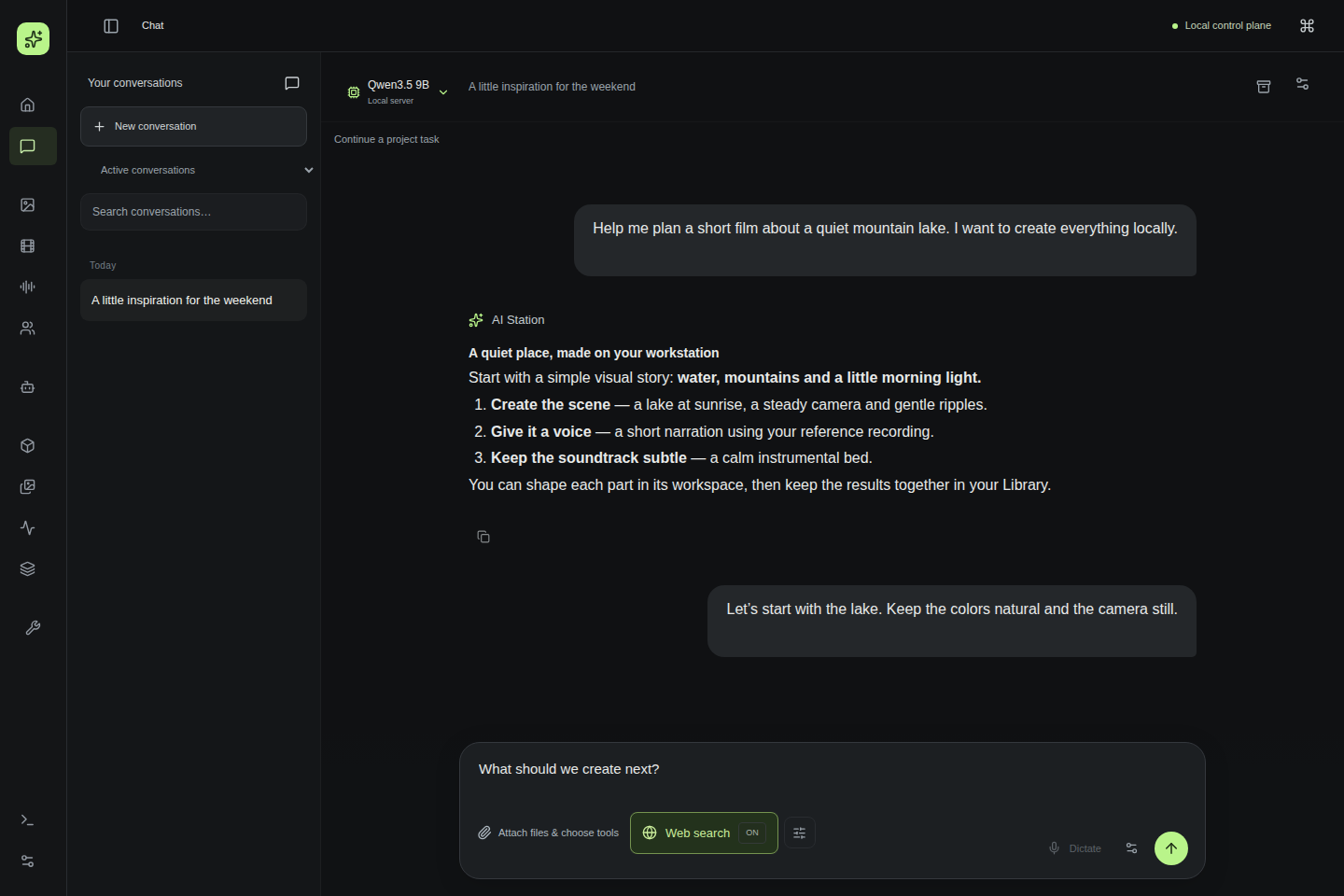
Start with a conversation. Keep your ideas, files and results together.
Actual UI · private demo datasetPowerful local models. One simple workspace.
LESS SWITCHING. MORE MAKING.
Go from the first question to the final file.
Everything has a
place. Everything leaves a trail.
Choose a local model. Bring your files, search the web when you need it, or ask the assistant to turn an idea into a workflow.
Images, edits, short films, talking portraits, speech and music. Find and reuse references from your private Library, with larger image previews and stills from your films.
Describe a recurring task in chat. Review its model, tools and schedule, then enable it right there. Pause or remove agents when you no longer need them.
NEW IN v0.2.1
Local AI keeps moving. Add compatible new models after setup,
without guessing what your hardware can handle.
Find models for conversation, images, video, voice, music, avatars or memory. Browse popular or recently updated sources, search by name, or paste a Hugging Face link.
Check each GPU, conversation context, RAM, disk and companion files before downloading weights. Unknown requirements and unsupported model families stay clearly marked.
Review the files and license, install compatible models and select them in their workspaces and supported assistant or agent settings. New revisions never replace your choices silently.
OWN THE WORKSPACE
AI should feel personal.
So should the computer it runs on.
Use your own GPU and compatible model weights, including uncensored models. Configured local inference needs no cloud AI account.
Inspect the model, execution target, permissions, logs and output files. Cancel owned Runs, pause scheduled agents and keep a history you can return to.
Your local workflows stay local. External inference is opt-in; web search, downloads and private remote access use the network.
FROM THE REFERENCE WORKSTATION
100s
LUSTIFY · 768 × 1024
Q4_0 · 8 steps
7m 58s
Wan · 1280 × 704
Two shots on separate GPUs
16.9 tok/s
RVN 27B · Q4_K_M
One observed completion
48m 18s
EchoMimic · 384 px
Includes speech and assembly
Recorded on one workstation, with specific models and presets. Results vary with hardware, settings and workload; these are not universal speed or quality guarantees.
Settings & full methodologyThe Docker control plane keeps the interface, history and orchestration together. A native user-level Host Runner handles typed host operations over a private Unix socket.
You bring the hardware. We're building a simple path from installing the app to your first conversation, without terminal commands or model-server configuration.
v0.2.1 offers desktop packages for Ubuntu 24.04 x86-64 and Windows 11 x64, with guided account and model setup. Windows first use is CPU-tested; physical NVIDIA tests follow release. macOS is not supported yet. Installation and known issues →
Unsigned Windows installer. SmartScreen may show an unknown publisher; Smart App Control or managed policies may block it. Verify the official download and SHA256SUMS. Do not disable OS protections. Signing will follow in a later release.
THE EXPERIENCE WE'RE BUILDING
A single place for your local AI tools.
Your hardware is checked. Models that fit are suggested. You choose what you want to create.
Ask a question, make something or put an agent to work. No AI expertise needed.
# Get the release branch
git clone --branch master https://github.com/jahu/ai-station.git
cd ai-station
cp .env.example .env

# Prepare your workstation
./scripts/bootstrap.sh

# Set model/runtime paths in .env, then:
./scripts/start.shBUILD THIS WITH US
We especially need testers and honest feedback. Try it on your hardware. Tell us what worked, what broke and where you got stuck. Confusing setup is worth reporting, too. Tell us what you tried, what you expected and what happened.
No technical background needed. Please keep passwords and private files out of public reports.
Configured local LLM and media workflows run on your workstation. You can choose external providers, and tools such as web search need network access. The website itself has no analytics, account signup or external font requests.
Yes. Open Models → Find new models to search public Hugging Face sources or paste a model link. AI Station checks supported model families, hardware and required files before a reviewed download. Compatible runtimes and OpenAI-compatible endpoints remain available. Finding a model does not make every architecture supported; the result explains what fits and what needs a runtime. Read the model guide.
No. The architecture discovers devices dynamically; the reference machine has two RTX 3060 cards, but that is not a requirement. Each workload must fit its runtime and hardware. Current exercised media paths use NVIDIA/CUDA; broader GPU compatibility is a roadmap goal.
That's who we're building it for. The goal is simple: download the app, follow the setup and start creating, without learning model servers or technical configuration. v0.2.1 packages Python and the app, guides required OS permissions and recommends models for your hardware. Model downloads still need storage and suitable RAM/VRAM. Windows CPU first use is tested; physical NVIDIA and human voice/film evaluation follow release. macOS is unsupported. Your feedback will help us make setup better. See qualification and known issues.
It is source-available under PolyForm Noncommercial 1.0.0. Permitted noncommercial use is free. Other commercial use requires a separate written license. Models and third-party components retain their own terms. Commercial licensing details.
Yes — and testing is one of the most useful ways to help. Report a bug, tell us what felt confusing, improve the docs or suggest a feature. For code changes, contributors retain copyright and provide a signed agreement permitting commercial relicensing before merge. Start with the contribution guide.
INDEPENDENT INTELLIGENCE.